Client management for personal trainers: what to track
Before a session, a personal trainer usually needs four answers: what did this client do last time, is their knee still bothering them, how many sessions remain in their package, and what is scheduled next? With a small roster, some of that can stay in your head. As the roster grows, memory becomes an unreliable filing system.
This page covers the information worth keeping for every client, where notebooks and spreadsheets become inconvenient, and how client management works in FitLinkPro.
What a trainer needs to know about a client at any moment
The list is short, but every item has to be at hand during the session, not at home in the evening.
Goal and relevant limitations. Why the person came, what currently bothers them and which movements may need to be adapted or avoided. These details shape the program and are especially useful when a client returns after a break.
Session history. Not "was here last week" but the specifics: exercises, sets, reps, loads. Without this, progression becomes guesswork, and the client fairly asks why today's weight is the same as a month ago.
Measurements. Body weight, circumferences and any other measurements you use. A single reading says little on its own; a series makes gradual change easier to see.
Payments and sessions remaining. Who paid for what, how many sessions are left in the package and when it is time to discuss a renewal. Keeping this current prevents unpaid sessions and awkward conversations about who owes whom.
Schedule. Who comes when, where the gaps are, whether two people landed on the same slot. With clients who train at different times every week this is a job in itself.
Five things. Every trainer tracks them one way or another. The only question is where.
Where notebooks and spreadsheets stop working
A notebook is quick to use on the gym floor, and a well-built spreadsheet can calculate almost anything. The difficulty is keeping several tools current while you are coaching.
The data lives in different places. Sessions may be in a notebook, payments in the phone's notes, measurements in a spreadsheet and appointments in a calendar. To check how many sessions a client has left and when they last deadlifted, you may need to open three sources.
Calculations need to be set up and maintained. A spreadsheet can calculate tonnage, working-weight trends and measurement changes, but only after someone builds the formulas and keeps the data organised.
One notebook for everyone means each client's history is scattered. One person's entries alternate with everyone else's. Finding their last lower-body session means flipping back and scanning.
A spreadsheet can be awkward on the gym floor. If entries are postponed until the evening, the trainer has to reconstruct the session from memory or copy it from another record.
There is no universal roster size at which this becomes a problem. The warning sign is having to search several places before you can answer a routine question during a session.
How client management works in FitLinkPro
In FitLinkPro, each client has one profile connected to their training records.
The client profile
Goals, limitations, contact details, measurements and the full session history in one place. Open the client before the session and you see what happened last time and what is planned for today. No need to remember which file holds their intake form.
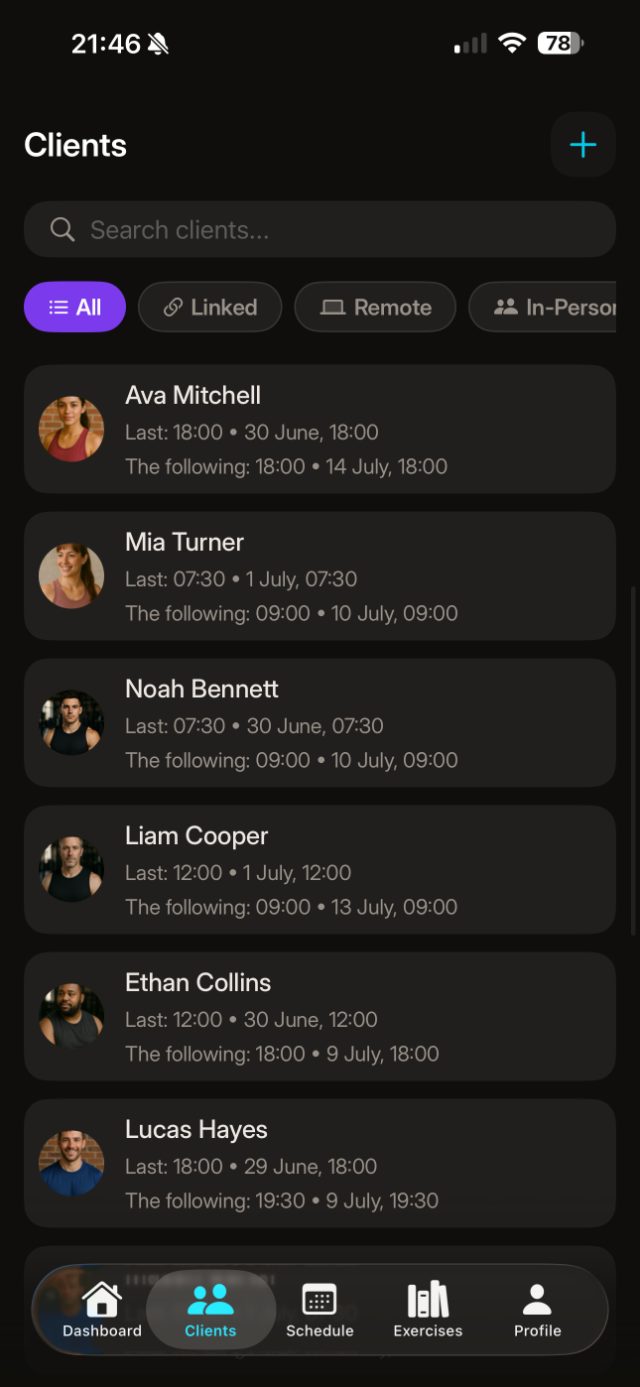
Sessions are logged as they happen
Sets, reps and loads go in during the session, between sets, in a couple of taps. Drop sets and supersets the same way. Exercises come from the library; you can add your own with video. The entry becomes part of the client's history immediately — nothing to copy over later.
Load and progress are calculated for you
For every logged session the app totals the tonnage and shows trends by exercise and muscle group. Measurements build into a chart, and personal records are flagged automatically. The difference from a spreadsheet is that these views are generated from the session log without separate formulas or duplicate entry.
Payments and session packages
Mark a payment and the app keeps count of the sessions remaining in the package and shows when it is running out. Monthly income is visible separately, so payment status does not have to be reconstructed from messages or bank notifications.
Schedule
Sessions are planned in the app and can be synced with the device calendar. You can save more than one training session at the same time. Recurring events are not currently available, so repeating appointments have to be added individually.
The client sees their own progress
A client can connect to the app by link or QR code. You can then send them a workout to complete in Athlete mode, and the results return to their profile. This supports simple remote programming and gives the client a record of their progress. A video and a written program do not replace live instruction when someone needs help learning exercise technique.
What FitLinkPro does not do
It is also worth knowing where the product stops.
It is not an online booking service with a public widget where clients book themselves. The trainer keeps the schedule.
There is no in-app chat, no nutrition planning and no branding under your studio's name. If those are the point, you want a coaching platform; FitLinkPro is a trainer's tool that works first of all on the gym floor.
FitLinkPro is made for iPhone. There is no Android version, so it is not a fit if the trainer or client needs Android support.
Pricing
FitLinkPro costs $2.99 a month or $29.99 a year, with no per-client surcharge. Many coaching platforms, including TrueCoach and Trainerize, use client limits or pricing tiers; FitLinkPro uses one subscription price regardless of roster size. New subscribers get a 7-day trial, and the subscription is managed through the App Store.
Where to start
There is no need to migrate every old record on the first day. Add one or two clients who are training this week and log those sessions in the app. After several sessions, you will know whether the workflow is quicker than the system you use now. The rest of the roster can be added later.
FitLinkPro is available on iOS. There is no Android version.